



Google Checkout Store Gadget Makes E-commerce Easy
By Kris Themstrup In Blogging News, E-commerce Basics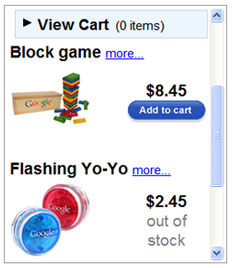 In their continuing effort to dominate every aspect of your online experience, Google has taken e-commerce to the masses with the experimental release of the Google Checkout Store Gadget, a simple application that makes it possible for anyone with a blog or website to create an online store, with Google Checkout, in under 5 minutes. Google makes it sound very easy when explaining how to setup the gadget and manage the store, and with Google’s popularity and typical wide-spread adoption, this just might be the breakthrough many people need to open up the floodgates to selling online. Although still in beta-mode, Google Store Gadget has the potential to significantly empower those who normally could only turn to sites like Ebay for their e-commerce ideas.
Setting up the Google Checkout Store Gadget seems easy enough. Google states that there are 3 simple steps to getting up and running:
- Sign up for Google Checkout
- List Products in a Google Docs Spreadsheet
- Embed the Gadget Anywhere
All of these steps are obviously free and can be done by even those with very limited coding knowledge. Managing inventory in a spreadsheet and setting it up are as easy as clicking a few boxes to share it online and publish it as a website. Embedding the gadget can be done basically anywhere, as long as HTML code can be added to a site. This means bloggers, website owners and more can quickly add the gadget to their site, enabling product or service sales without the typical hassle of an e-commerce management platform.
Having an e-commerce enabled website has always brought it’s share of headaches. Along with unusually complicated platforms, there are merchant accounts, encryption, certificates, product management and inventory to consider. The Google Checkout Store Gadget takes care of all of these processes through a few easy steps. In a struggling economy, it makes sense that individuals with blogs could use this to make extra money, and sell products directly on their site.
In addition to the Google Checkout Store Gadget setup page, Google provides a full tutorial and online forum for help with the gadget.
No Comment